
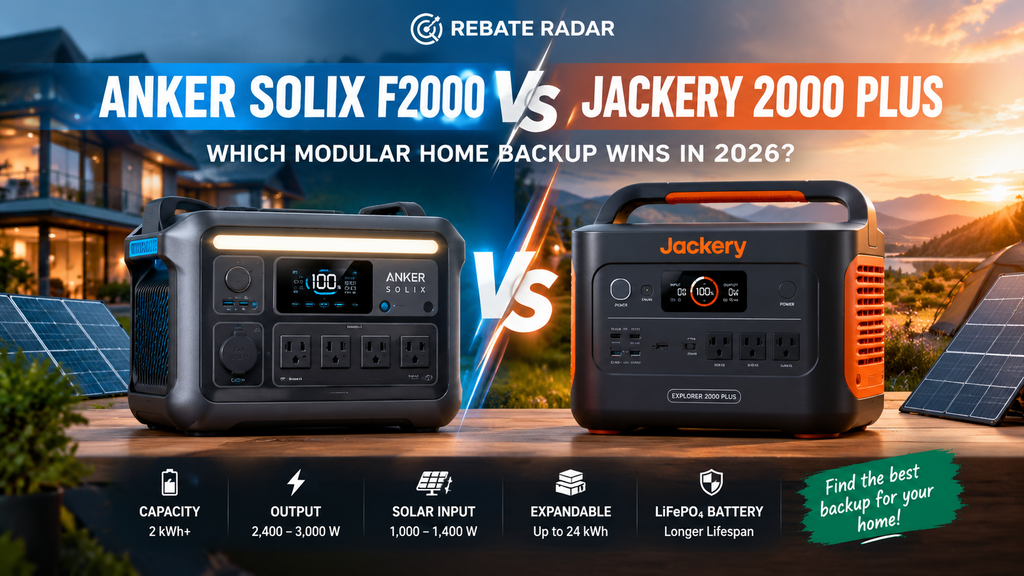
Anker SOLIX F2000 vs. Jackery Explorer 2000 Plus: Which Modular Home Backup Wins in 2026?
Both portable power stations start at roughly 2 kWh, use LiFePO₄ battery chemistry, and can support a serious emergency-power setup. The difference is how much output you need today—and how far you want your system to grow tomorrow.
Updated for a 2026 buying decision. Specifications, compatible accessories, stock, and prices can change; verify the exact configuration before purchase.
The short answer
Choose the Anker SOLIX F2000 if you want a capable, relatively straightforward portable power station for essential appliances, electronics, and moderate backup loads—and its 2,400 W output fits your equipment.
Choose the Jackery Explorer 2000 Plus if you want more continuous AC output from the base unit and a much larger published expansion path. Its modular architecture is the more compelling option for someone who may build toward a bigger backup system over time.
Important distinction: the Jackery’s expansion capability does not mean one base unit can automatically power every circuit in a home. A whole-home or selected-circuit setup can require compatible accessories, transfer equipment, electrical work, and a careful load plan.
Anker SOLIX F2000
2,048 Wh · 2,400 W AC output
- LiFePO₄ battery chemistry
- Published 1,000 W maximum solar input
- UPS-style switching specification of 20 ms
- Expandable with a compatible battery to 4,096 Wh
View Anker’s official specifications
Check Anker SOLIX F2000 on Amazon
Affiliate link. Check the current price, exact model, and included accessories before checkout.
Jackery Explorer 2000 Plus
2,042.8 Wh · 3,000 W AC output
- LiFePO₄ battery chemistry
- Published expansion path of approximately 2–24 kWh
- Up to 6,000 W output in a supported parallel configuration
- 120/240 V capability requires the appropriate compatible setup
View Jackery’s official product page
Check Jackery Explorer 2000 Plus on Amazon
Affiliate link. Verify the exact model, price, and included accessories before checkout.
1. Our verdict: Anker SOLIX F2000 vs. Jackery 2000 Plus
The Anker SOLIX F2000 and Jackery Explorer 2000 Plus occupy a similar starting point in the portable-power market: each gives you around 2 kWh of stored energy, a built-in inverter, several ways to charge, and a lithium iron phosphate battery. Yet the headline capacity alone does not tell you which is the better buy.
The most meaningful differences are AC output, expansion options, solar input, system compatibility, portability, and the total cost of the configuration you actually need. The Anker F2000 is rated for 2,400 W of AC output. Jackery rates the Explorer 2000 Plus at 3,000 W from the base unit and advertises a higher output in a supported parallel configuration.
That difference can matter when several appliances operate at once. A 3,000 W rating gives the Jackery more headroom than a 2,400 W rating, but it does not guarantee that every motor, compressor, or heating appliance will start successfully. Startup surges, power factor, circuit limits, and the combined load still matter.
Before choosing either one, decide whether you need to keep a refrigerator, modem, lights, laptops, and medical or communications equipment running for a few hours, or whether you are trying to support larger appliances over an extended outage. Those are very different energy problems.
2. Anker SOLIX F2000 vs. Jackery Explorer 2000 Plus: specifications
The following table summarizes manufacturer-published specifications. Figures can vary by product revision, region, firmware, bundle, and accessory. Confirm the specifications on the exact listing you plan to purchase.
| Specification | Anker SOLIX F2000 | Jackery Explorer 2000 Plus |
|---|---|---|
| Base capacity | 2,048 Wh | 2,042.8 Wh |
| Battery chemistry | LiFePO₄ / LFP | LiFePO₄ |
| Rated AC output | 2,400 W | 3,000 W |
| Advertised surge rating | Check current manual and exact configuration | 6,000 W peak, per published product information |
| Solar input | Up to 1,000 W | Up to 1,400 W across supported inputs |
| Expansion | Compatible expansion battery; up to 4,096 Wh in the listed configuration | Expandable system advertised up to approximately 24 kWh |
| UPS switching | Published specification: 20 ms | Do not assume computer-grade zero interruption; check current documentation and test your device |
| 240 V support | Not a native 120/240 V output from one F2000 unit | Possible only in a supported expanded/parallel configuration with required equipment |
| Battery cycle-life claim | Manufacturer lists 3,000 cycles | Manufacturer lists 4,000 cycles to 70%+ capacity |
| Warranty | Verify current regional terms; Anker lists a 5-year warranty | Published US offer: 3-year standard plus 2-year extension under stated conditions |
These specifications are not all measured on the same basis. In particular, a cycle-life figure normally refers to a defined laboratory test and remaining-capacity threshold, not a promise that every battery will reach that number under every temperature, load, charging pattern, or storage condition.
Similarly, maximum solar input is a ceiling, not a promise of constant charging speed. Real charging depends on panel wattage, sunlight, angle, temperature, shading, cable losses, and whether the station is simultaneously supplying loads.
3. Capacity: how long will each power station run your equipment?
Both base units store about 2 kWh. That makes their initial energy capacity very similar. In everyday terms, watt-hours estimate how much energy a battery stores, while watts measure how quickly energy is being delivered.
A simple planning calculation is:
Estimated runtime in hours = usable battery energy in Wh ÷ device power in W
For a more realistic estimate, allow for inverter losses, battery reserve, temperature, device cycling, and other system limits. The examples below use a simplified planning assumption of 85% usable energy; actual performance may be higher or lower.
| Average combined load | Approximate runtime from 2,043 Wh at 85% usable energy | Typical use |
|---|---|---|
| 50 W | 34.7 hours | Modem, router, small electronics |
| 100 W | 17.4 hours | Network equipment and several small devices |
| 250 W | 6.9 hours | Moderate electronics load |
| 500 W | 3.5 hours | Several appliances running together |
| 1,000 W | 1.7 hours | High continuous load |
These are estimates, not guarantees. Refrigerators cycle on and off, so their average consumption can be much lower than their starting draw. Space heaters, kettles, hair dryers, and other resistive heating devices can consume substantial energy continuously. That can drain a 2 kWh station much faster than a router or a few LED lights.
What can you realistically power?
A properly planned 2 kWh power station can be useful for keeping a selected group of essential devices operating during a short outage. Depending on the equipment and runtime you need, that could include:
- Wi-Fi router and modem
- Phones, tablets, and laptops
- LED lamps and small lighting systems
- A refrigerator, if its startup surge and running consumption are compatible
- Small fans and selected low-wattage appliances
- Some communications equipment and electronics
It is not automatically sufficient for air conditioning, electric water heating, an electric range, clothes drying, or a whole home. Those loads can require considerably more continuous power and energy than a single 2 kWh station provides.
For a deeper planning guide, see How Many Home Batteries Do I Need in 2026? and Home Battery Backup Cost in 2026.
4. Output, surge power, and demanding appliances
On paper, the Jackery Explorer 2000 Plus has the advantage in continuous AC output: 3,000 W compared with 2,400 W for the Anker F2000. That additional 600 W can provide useful headroom if you want to run several devices at the same time.
Imagine a load consisting of a refrigerator, networking equipment, a few lights, and a laptop setup. The combined running demand might be manageable for either model. Add a high-draw appliance, however, and the total can exceed the Anker’s output limit before the battery itself is empty. The Jackery’s higher rating may provide more flexibility, but the appliance’s starting surge still needs to be checked.
Continuous watts versus surge watts
Continuous output is the power the inverter is rated to deliver over sustained operation under specified conditions. Surge output describes a higher short-duration capability intended to accommodate certain startup loads. The duration and conditions for that surge matter.
Motors and compressors can draw more power when starting than they do once running. A refrigerator, pump, or certain tools may therefore trip an inverter even when the average running wattage appears comfortably below the station’s rated output.
Before connecting an appliance:
- Find its running wattage or measured power consumption.
- Check the nameplate and manufacturer guidance for startup current or surge requirements.
- Confirm that the power station’s continuous and surge limits cover those requirements.
- Consider what other devices will be running at the same time.
- Verify outlet current limits and any restrictions in the power station’s manual.
Can either unit power a 240 V appliance?
The standard Anker SOLIX F2000 provides 120 V AC output and should not be treated as a native 120/240 V home power system. The Jackery Explorer 2000 Plus can support higher system output and 120/240 V in a compatible expanded configuration, but that capability is not the same as having a 240 V outlet available on every single base unit.
Check which parallel accessory, cables, battery packs, and transfer equipment are required for the exact configuration. Verify the supported voltage and output modes before purchasing an appliance or designing a backup circuit around them.
If your goal is to power selected household circuits rather than plug devices directly into the station, read our guide to Portable Power Stations vs. Backup Generators.
5. Modular expansion: which system grows further?
This is the most important difference for buyers who use the phrase “modular home backup.” A modular system lets you add compatible battery capacity or combine equipment as your needs grow. But each product has a limit, and expansion usually costs extra.
Anker SOLIX F2000: a simpler expansion path
The F2000 starts at 2,048 Wh. Anker lists a compatible expansion battery that can bring the listed configuration to 4,096 Wh. This can be a sensible middle ground if you want more stored energy without moving immediately to a larger, heavier home-backup platform.
The trade-off is the smaller expansion ceiling compared with the Jackery Explorer 2000 Plus system. If you already know that you may eventually need many kilowatt-hours of storage, the F2000’s expansion path may not align with that longer-term plan.
Jackery Explorer 2000 Plus: built for a larger expansion plan
Jackery advertises the Explorer 2000 Plus as expandable from approximately 2 kWh up to 24 kWh with compatible expansion batteries and supported configurations. That gives the system a stronger case for people who want to start with one unit and increase stored energy over time.
However, expansion does not automatically multiply every capability. Battery packs primarily increase energy storage; output depends on the inverter and the configuration used. Higher system output, 240 V operation, or home-circuit integration may require additional compatible hardware.
Before buying extra batteries, verify the maximum supported number, compatibility with your exact station revision, required cables, firmware or setup requirements, and the warranty conditions. Do not assume that expansion batteries from another product family will work.
Jackery Extra Battery Pack 2000 Plus
This compatible expansion battery is designed for the Jackery Explorer 2000 Plus series. Its listed capacity is 2,042 Wh, allowing you to increase stored energy in a supported configuration. Confirm compatibility with your exact power station and review the manufacturer’s instructions before purchasing.
Best fit: Jackery Explorer 2000 Plus owners who need additional stored energy and have verified the compatible configuration.
Check Jackery Expansion Battery on Amazon
Affiliate link. Check compatibility, price, and availability before ordering.
| Your long-term goal | More relevant option | What to check |
|---|---|---|
| Portable emergency power with modest expansion | Anker SOLIX F2000 | Whether the base unit and one compatible battery meet your runtime needs |
| Build toward a much larger stored-energy system | Jackery Explorer 2000 Plus | Expansion limits, total cost, supported output modes, and accessory availability |
| Support selected household circuits | Compare complete system packages | Transfer equipment, electrical compatibility, installation, and code requirements |
| Run substantial 240 V loads | Evaluate a purpose-built 120/240 V configuration | Actual load requirements and the exact supported system arrangement |
Expansion can be a good way to spread spending over time, but it is not always the cheapest way to reach a target capacity. Compare the price of the initial unit plus all the batteries and accessories you expect to need against a larger system purchased from the start.
6. Solar charging: which is better for off-grid use?
Solar input determines how much solar power a station can accept under compatible conditions. The Anker F2000 lists up to 1,000 W of solar input. The Jackery Explorer 2000 Plus lists up to 1,400 W across its supported solar inputs. On maximum input alone, the Jackery has a higher published ceiling.
That does not guarantee it will recharge faster in every real-world situation. A station cannot draw more energy than the panels, sunlight, input voltage/current limits, and charging conditions allow. A 1,400 W input rating also does not mean a 1,400 W panel array will deliver that output continuously.
What determines actual solar charging speed?
- Panel capacity: total rated watts determine the theoretical ceiling of your array.
- Sunlight: clouds, shade, season, roof orientation, and panel angle reduce output.
- Voltage and current: panels must remain within the station’s accepted input range.
- Temperature: panel and battery temperatures can affect performance and charging limits.
- Concurrent use: power being consumed by appliances is not available to increase the stored charge.
- Battery state: charging power may change as the battery approaches full capacity.
For a household that plans to recharge during a blackout, panel compatibility and safe deployment are especially important. Portable panels can be useful, but their actual production varies throughout the day. If you expect multiple days without grid power, size the panel array around daily energy consumption rather than relying on a single headline charging time.
Can solar panels recharge either station during an outage?
Yes, when the station is compatible with the panels and the solar input is connected correctly. Unlike a typical grid-tied rooftop solar installation, a portable power station can generally accept compatible portable solar panels without needing the utility grid to be available. Follow the manufacturer’s setup instructions, including connector polarity, input voltage limits, and weather precautions.
Do not connect a rooftop solar array directly to a portable power station unless the equipment and wiring are explicitly compatible. Residential solar arrays can operate at high DC voltages, and their wiring and disconnect requirements differ from those of portable panels.
Read our related guides on Best Portable Power Stations in 2026 and Best Off-Grid Solar Kits in 2026.
7. LiFePO₄ lifespan, cycle life, and long-term ownership
Both products use lithium iron phosphate, commonly abbreviated as LiFePO₄ or LFP. This chemistry is widely used in portable power stations because it can offer a long cycle life and strong thermal stability compared with some other lithium-ion chemistries. That does not make a battery indestructible or eliminate the need to follow its safety instructions.
Anker lists 3,000 cycles for the F2000, while Jackery lists 4,000 cycles to 70% or more remaining capacity for the Explorer 2000 Plus. These claims should be read alongside each manufacturer’s test conditions and warranty terms. They are not a direct guarantee of identical service life in your home.
What does cycle life mean?
A battery cycle represents energy use equivalent to a full charge and discharge, although the exact test method depends on the manufacturer. Several partial cycles can add up to the equivalent of one full cycle. For example, using about half the battery’s energy on two separate occasions can represent approximately one equivalent full cycle.
Battery degradation also depends on factors beyond cycle count, including storage temperature, operating temperature, charging habits, depth of discharge, and how long the battery remains at a high state of charge. Use the manufacturer’s recommended storage and operating procedures.
Which one has the better lifespan?
On the published cycle-life figures alone, Jackery has the higher stated number. That is a useful specification, but it should not decide the purchase by itself. The warranty, cost of expansion batteries, usable capacity, support, and the system’s real-world fit all matter.
A battery that lasts many cycles is not necessarily the better value if you pay much more for capacity you rarely use. Conversely, a lower initial cost may not be attractive if you need to buy another unit soon to cover your essential loads.
Warranty details to check before checkout
- Standard warranty duration and whether registration is required.
- Any extension that depends on purchasing from a particular seller or registering the product.
- Coverage for the power station versus expansion batteries and accessories.
- Exclusions involving misuse, water exposure, temperature, unauthorized repair, or normal degradation.
- How warranty service is handled in your region.
Always use the warranty document that applies to your purchase date and location. Retailer listings and promotional pages can change, and an extended warranty may have specific conditions.
8. Which power station fits your household?
Scenario A: apartment, internet, lights, and electronics
If your goal is to keep a router, phone chargers, laptops, and LED lighting operating through a short outage, either base unit may be more power than you need—or a good choice if you want extra capacity for future use. The Anker F2000 may be sufficient if the combined load is within its output limit. The Jackery provides more continuous AC headroom, but that may not be worth paying extra for if your loads are modest.
Estimate the watt-hours you use during the outage first. A 30 W router running for 12 hours uses about 360 Wh before losses. Add the laptop, lighting, and phone charging, and you can build a more realistic energy budget instead of buying based on the size of the house.
Scenario B: refrigerator plus essential electronics
Both stations may be candidates for a carefully planned refrigerator backup, but do not rely only on the refrigerator’s annual energy label. The starting surge, actual running watts, temperature, and door-opening frequency affect consumption. Measure the appliance where practical and check the power station’s specifications.
Consider whether you want the refrigerator to run continuously or only periodically. Cycling it manually may extend runtime, but it also creates food-safety and temperature-management concerns. Monitor the refrigerator’s temperature and follow food-safety guidance during extended outages.
Scenario C: longer outages with portable solar panels
For repeated outages, solar recharging and expansion become more important. The Jackery’s higher published solar-input ceiling and larger expansion path may be attractive if you plan to add compatible batteries. The Anker may remain a sensible choice for smaller loads or buyers who do not need a large modular system.
Remember that cloudy weather can reduce solar production sharply. If your home needs reliable energy for several days, estimate consumption conservatively and consider how you will recharge when solar conditions are poor.
Scenario D: selected household circuits
When you want to power fixed circuits, including selected lights or outlets, the comparison shifts from the power station alone to the entire system. You need to understand transfer equipment, circuit selection, grounding and neutral requirements, power limits, and the electrical code requirements that apply to your home.
Do not backfeed a home circuit through a standard outlet or improvise a connection to a breaker panel. Improper connections can create electrocution and fire hazards and can energize utility lines during an outage. Use manufacturer-approved equipment and a qualified electrician for any fixed wiring or transfer-switch installation.
If your long-term target is a more integrated battery system, compare these portable products with the options in EcoFlow DELTA Pro Ultra vs. Tesla Powerwall 3 and Tesla Powerwall Alternatives in 2026.
9. Portability, design, and everyday use
Portable power stations are not equally easy to move. The Anker F2000 and Jackery Explorer 2000 Plus are both substantial pieces of equipment, and their published weights are around 60 pounds or more. That is manageable for some users but not comfortable for everyone, especially on stairs or uneven ground.
Consider where you will store the station, how you will move it during an emergency, and whether the cables and solar panels will be easy to deploy. Wheels or handles can help, but they do not eliminate the weight of the unit. Expansion batteries add further bulk.
App controls and monitoring
Depending on model and supported features, an app can help monitor battery state, input and output power, and operating settings. That can be useful when you want to know how quickly a refrigerator or other appliance is consuming stored energy.
Do not assume that app connectivity is essential to operation or that every feature works the same way across firmware versions. Review the current manual and app feature list, and check whether the unit can be monitored locally if your internet connection is down.
Noise and indoor use
Battery power stations do not have the combustion engine noise of a conventional portable generator, but their cooling fans may run under load or while charging. Noise depends on operating conditions and product design.
Follow the manufacturer’s requirements for ventilation, clearance, temperature, and indoor or outdoor placement. A battery station is not a combustion generator, but that does not mean every model or charging setup is safe in every room or exposed location. Keep it away from water, heat sources, and conditions outside its rated operating range.
10. The real cost: base unit, expansion batteries, solar panels, and accessories
Comparing only the advertised price of each base station can produce the wrong answer. A modular backup system may require extra batteries, solar panels, parallel accessories, a transfer switch, wiring, or professional installation. Those costs can be significant relative to the initial unit.
Because retailer prices and promotions change frequently, this guide does not treat a single displayed price as a permanent 2026 price. Check the live listing and make sure the product configuration is the one you intend to purchase.
Build a complete-cost estimate
| Cost component | Questions to ask |
|---|---|
| Base power station | Is it the exact F2000 or Explorer 2000 Plus model? |
| Expansion batteries | How many are needed to reach the target usable energy? |
| Solar panels | Are panels included, compatible, and sufficient for your daily energy use? |
| Expansion or parallel hardware | Are special cables, hubs, or accessories needed for the advertised configuration? |
| Transfer equipment | Is an approved transfer switch or home integration accessory required? |
| Installation | Will an electrician need to install circuits, outlets, or a transfer switch? |
| Future capacity | Is it cheaper to add batteries later or buy a larger system now? |
For an apples-to-apples comparison, calculate the cost per usable kilowatt-hour for each complete configuration, not only the cost per advertised watt-hour of the base station. Also consider the output capacity you need: a large battery with a low inverter rating may store plenty of energy but still be unable to run a high-demand appliance.
Explore Home Battery Backup Cost in 2026 for more context on sizing and system expenses.
11. Affiliate picks: larger backup systems worth comparing
The following products are alternatives from the supplied affiliate links, not the two models in the main comparison. They target different needs, especially buyers who want more capacity or more output from the start. Check the live listing for the current bundle, price, availability, and included accessories.
Anker SOLIX F3800 Portable Power Station
The F3800 is a different and substantially larger product than the F2000. Anker lists a 3,840 Wh base capacity, 6,000 W AC output, 120/240 V support, and expansion options that can bring a supported system to a much higher total capacity. This makes it more relevant to buyers who have outgrown the F2000’s output or expansion limits.
Best fit: buyers who need higher output and a more substantial backup platform. It is larger and heavier than the F2000, so it is not automatically the better portable choice.
Check Anker SOLIX F3800 on Amazon
Affiliate link. Verify exact model, battery bundle, and included accessories before checkout.
Jackery Explorer 5000 Plus Power Station
The Explorer 5000 Plus starts at 5,040 Wh and is listed at 7,200 W output with 120/240 V capability. Jackery advertises expansion up to 60 kWh in supported configurations. This is a different class of system from the Explorer 2000 Plus, with a higher initial capacity and output intended for more demanding backup scenarios.
Best fit: households looking for a higher-capacity starting point, particularly when their planned loads justify a larger and more expensive system. Confirm transfer-switch compatibility and the installation requirements for your intended circuits.
Check Jackery Explorer 5000 Plus on Amazon
Affiliate link. Price and package contents may change.
Jackery Explorer 2000 v2 with Two 200 W Solar Panels
The Explorer 2000 v2 is not the Explorer 2000 Plus. The v2 is a separate product with 2,042 Wh capacity and 2,200 W rated AC output, according to Jackery’s specifications. It can be a useful option for essential backup, portable use, and charging from compatible solar panels, but it does not share every expansion feature of the 2000 Plus.
Best fit: shoppers who prioritize portable backup and want to compare a solar-panel bundle. Check the included panel wattage and exact v2 configuration, and do not assume it expands to the same capacity as the Explorer 2000 Plus.
Check Jackery Explorer 2000 v2 on Amazon
Affiliate link. Check the exact bundle and product identifier before purchasing.
- If you like the Anker ecosystem but need a much higher output rating, investigate the F3800.
- If you want a higher-capacity, high-output expandable system, compare the Explorer 5000 Plus.
- If you want a portable station with solar panels included, check the exact Explorer 2000 v2 bundle.
These are alternatives for different requirements—not proof that the larger model is the best value for every household.
12. How to estimate your own backup needs
Before you buy, write down the devices you want to power, their running watts, and how long you want them to run. A small worksheet can prevent two common mistakes: buying too little battery energy or paying for a much larger system than you will use.
Step 1: list your essential loads
Start with the refrigerator, communications equipment, lighting, phone charging, and any other critical device. Use manufacturer labels, a plug-in power meter, or reliable device documentation to estimate consumption. Avoid assuming that the maximum rating printed on a device is its average consumption—or that its average consumption covers startup demand.
Step 2: calculate watt-hours
Multiply the average power in watts by the number of hours you want to use the device. A 60 W load running for 5 hours uses about 300 Wh. Add all of the loads together, then allow extra energy for conversion losses and unexpected use.
Step 3: check the inverter rating
Even if your total energy requirement is small, several devices operating at the same time can exceed the inverter’s power limit. Check both the combined running watts and the startup requirements of motors and compressors.
Step 4: decide how you will recharge
For a short outage, wall charging before a storm may be enough. For a long outage, plan for solar input, vehicle charging if supported, or another approved charging source. Consider how much energy your solar array can realistically produce on a cloudy day.
Step 5: choose expansion only when the numbers justify it
Expansion is useful if you expect to need more energy later. But do not buy extra batteries simply because the product supports them. Start with a defined goal—such as running selected appliances overnight—and calculate the capacity required to meet that goal.
Use our Home Energy Cost Calculator to explore household energy consumption, and see Solar Battery vs. Solar Generator for a broader comparison of portable and home battery options.
13. Buying checklist: what to verify before ordering
Use this checklist before choosing between the Anker SOLIX F2000 and Jackery Explorer 2000 Plus—or purchasing one of the larger alternatives.
- Exact model: confirm the product is the F2000, Explorer 2000 Plus, Explorer 2000 v2, F3800, or 5000 Plus as intended.
- Capacity: verify the base battery capacity and the usable energy you can expect in your conditions.
- Output: confirm continuous watts, surge conditions, voltage, outlet type, and current limits.
- Expansion: check the maximum compatible batteries and required accessories for the system configuration.
- Solar input: verify accepted voltage, current, connectors, and maximum input wattage.
- Transfer equipment: identify all equipment required if you intend to power fixed household circuits.
- Warranty: read the current terms for the station, batteries, and accessories.
- Weight and placement: confirm that you can safely move and store the system where it will be used.
- Price and bundle: check what is included, shipping, taxes, returns, and whether the advertised price applies to the exact configuration.
- Safety: follow the manual and use a qualified electrician for fixed wiring or transfer-switch work.
14. Common buying mistakes to avoid
Mistake 1: buying by watt-hours alone
Capacity estimates runtime, not how many appliances can run simultaneously. A station can store enough energy for several hours but still have an inverter that is too small for a particular appliance.
Mistake 2: confusing peak output with continuous output
Surge ratings apply only under specified conditions and durations. Use the continuous rating for sustained loads and check the startup needs of motors.
Mistake 3: assuming expansion batteries double the output
Expansion batteries generally increase stored energy. They do not necessarily increase the base inverter’s output unless the manufacturer supports a specific multi-unit configuration.
Mistake 4: assuming every model supports whole-home backup
Portable outlets and home-circuit integration are different use cases. A transfer switch or other approved equipment may be required, and the system must be designed for the home’s electrical setup.
Mistake 5: ignoring solar compatibility
Panels that physically connect may still be electrically incompatible. Check voltage and current limits and use the approved connectors and setup instructions.
Mistake 6: assuming a sale price will remain available
Promotions can end, and bundles can change. Compare the current listing for the exact model and accessory package rather than relying on an old screenshot or price from another configuration.
15. Final verdict: which modular home backup wins in 2026?
There is no universal winner, but the specifications point to different strengths.
You want capable portable backup
- Your essential loads fit within 2,400 W continuous output.
- A roughly 2–4 kWh configuration is enough for your plan.
- You value a straightforward setup and do not need native 240 V output from the base unit.
- You have checked that the price and compatible expansion battery make sense for your budget.
You want more output and expansion
- You need more continuous AC output from the base station.
- You want the option to build toward a larger supported battery system.
- You may need a compatible multi-unit setup for higher output or 120/240 V use.
- You are comfortable verifying the added cost of expansion batteries and accessories.
For many households, the Anker SOLIX F2000 is a sensible choice for essential backup and moderate loads. For buyers who prioritize modular growth and higher output, the Jackery Explorer 2000 Plus has the more compelling published expansion path.
If you already know that you need substantially more than 2 kWh or want to support more demanding home loads, compare the larger Anker SOLIX F3800 and Jackery Explorer 5000 Plus before purchasing a smaller base unit and adding accessories later. The right answer depends on the equipment you need to run, how long you need it to run, and the total cost of the completed setup.
The smartest purchase is not the station with the biggest number on the box. It is the configuration that can safely power your actual loads, provide the runtime you need, recharge under your conditions, and stay within your budget.
Frequently asked questions
Is the Anker SOLIX F2000 better than the Jackery Explorer 2000 Plus?
It depends on your priorities. The Anker F2000 provides 2,400 W of rated AC output and a smaller expansion path. The Jackery Explorer 2000 Plus provides 3,000 W from the base unit and advertises expansion to approximately 24 kWh in supported configurations. Choose based on your load requirements, expansion plans, and total cost.
Which power station has more battery capacity?
The base capacities are very similar: 2,048 Wh for the Anker F2000 and approximately 2,042.8 Wh for the Jackery Explorer 2000 Plus. The Jackery’s key capacity advantage is its larger advertised expansion path, not a meaningful difference in base capacity.
Does the Jackery Explorer 2000 Plus support expansion batteries?
Yes. Jackery advertises a compatible expansion system that can reach approximately 24 kWh. Verify the supported battery count, cables, configuration, and any accessories required for the exact product revision.
Can the Anker SOLIX F2000 power a whole house?
It is better treated as a portable power station for selected loads rather than a complete whole-home system. Its output and capacity limit what it can run, and fixed-circuit integration requires appropriate equipment and professional electrical work.
Can the Jackery Explorer 2000 Plus power 240 V appliances?
Jackery advertises 120/240 V capability in a supported expanded or parallel configuration. Do not assume that one base unit provides every voltage or outlet. Verify the exact configuration and required accessories before buying for a 240 V load.
Which power station has the longer battery lifespan?
Jackery lists 4,000 cycles to 70% or more remaining capacity for the Explorer 2000 Plus, while Anker lists 3,000 cycles for the F2000. Test conditions and warranty terms matter, and actual lifespan varies with temperature, use, and maintenance.
Can I charge these power stations with solar panels during a blackout?
Yes, using compatible panels within the manufacturer’s input limits. Real-world charging depends on sunlight, panel orientation, shade, temperature, and simultaneous power use. Check the exact voltage, current, and connector requirements before connecting a panel array.
Is the Explorer 2000 v2 the same as the Explorer 2000 Plus?
No. They are different products. The Explorer 2000 v2 has its own capacity, output, and features; it should not be assumed to support the same expansion options as the Explorer 2000 Plus. Confirm the exact model on the product listing.
Should I buy a larger power station instead?
If you need higher continuous output, more stored energy, or a supported 120/240 V home-backup setup, compare larger systems such as the Anker SOLIX F3800 or Jackery Explorer 5000 Plus. Include expansion batteries, transfer equipment, and installation in the cost comparison.
Are portable power stations safe to connect to a home’s breaker panel?
Only with equipment and a setup specifically approved for that purpose. Never backfeed a home circuit through an ordinary wall outlet. Fixed wiring and transfer-switch installation should be handled by a qualified electrician according to applicable electrical codes.
Sources and comparison methodology
This article uses manufacturer-published specifications to compare the two named models and identify differences in capacity, output, battery chemistry, solar input, and expansion. Specifications are not independent performance test results. Product revisions, firmware, bundle contents, regional warranty terms, and prices may change.
- Anker SOLIX F2000 — official product specifications
- Jackery Explorer 2000 Plus — official product specifications
- Anker SOLIX F3800 — official product specifications
- Jackery Explorer 5000 Plus — official product specifications
- Jackery Explorer 2000 v2 — official product specifications
Rebate Radar’s comparison is intended to help readers understand the trade-offs between portable power stations. It is not electrical engineering advice, a guarantee of runtime, or a substitute for the manufacturer’s manuals. Check the latest specifications and safety instructions before use.